Starting a study from a learning goal with the AI Assistant
Last updated: August 4, 2026
You don't need to know which research method to use before you start. From your Home screen, you can now describe what you want to learn in plain language, and Maze's AI Assistant will ask a few follow-up questions and recommend the best study type for your goal — then set you up in the right place to build it.
This is especially helpful if you're not a trained researcher: instead of choosing between Unmoderated, AI-moderated, and Moderated upfront, you describe your goal and let the Assistant guide the method.
Start from your learning goal
From your Home screen, you'll see Let's build your study at the top of the page, with a prompt to Describe your research questions or hypotheses, or start from a study type. In the input field, type what you want to learn — in your own words — and submit.
You don't need to phrase it like a researcher. For example:
"I want to understand why users are dropping off during onboarding."
"I'd like to know which of two checkout flows people find easier to complete."
"I need to run interviews with enterprise admins to understand how they set up permissions."
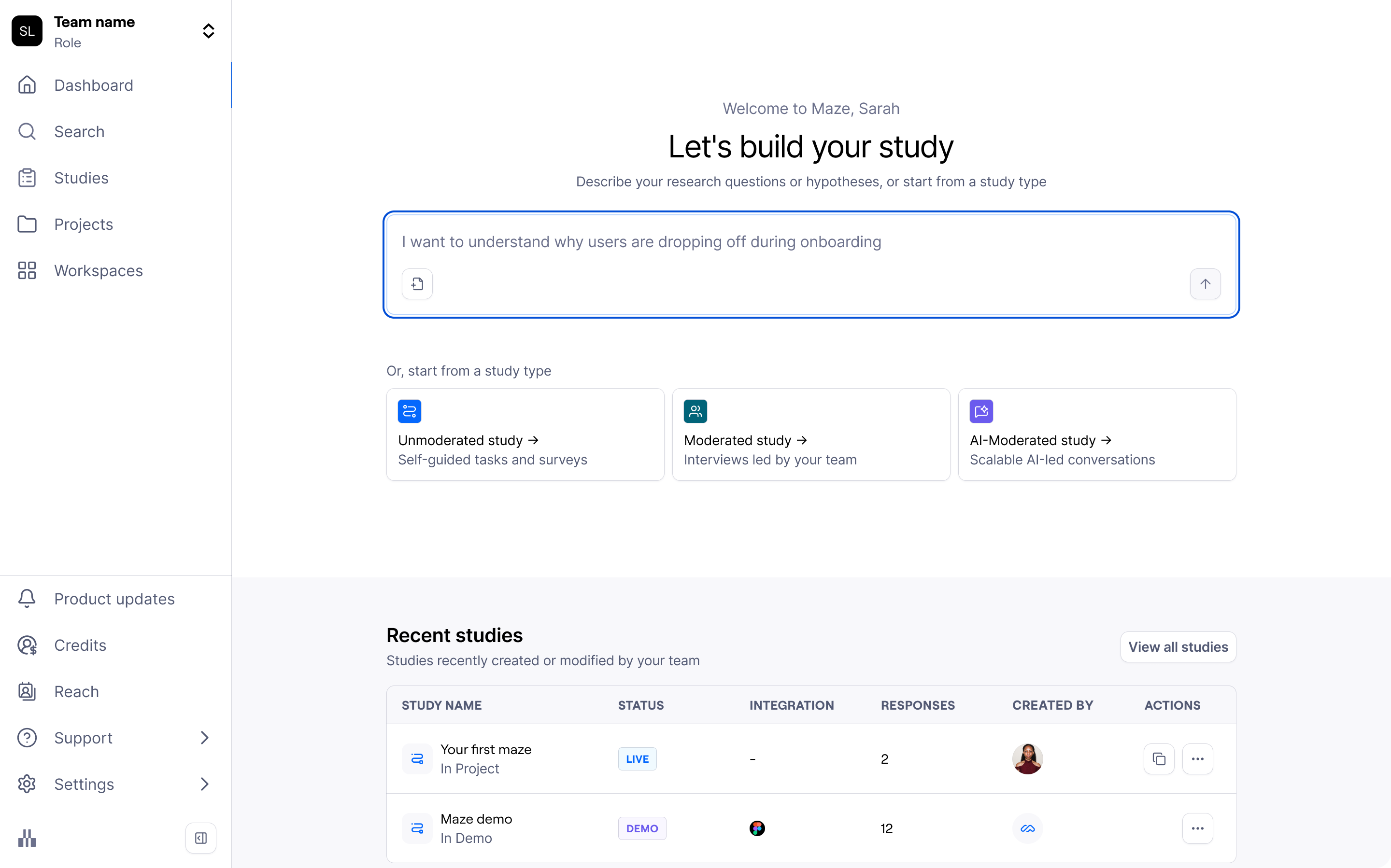
The Assistant uses your goal to understand what you're trying to learn and which study type will get you there.
Prefer to choose the method yourself? You can skip the Assistant and Start from a study type using the cards below the input field:
Self-guided tasks and surveys → Unmoderated study
Interviews led by your team → Moderated study
Scalable AI-led conversations → AI-moderated study
Add context and attachments
The more context you give the Assistant, the more tailored its recommendation will be. You can keep adding detail in the conversation, and you can also attach a file to give it richer background — for example:
A research brief or research plan
A PRD, spec, or product one-pager
Notes from a previous round of research
You can attach a file with your first message ("Here's our research plan — help me figure out the right study type") or later in the conversation as the discussion develops. The Assistant will use the document's content to sharpen its questions and narrow its recommendation.
Review the Assistant's recommendation
Once it has enough to go on, the Assistant recommends a study type — and explains why it's the right fit for your goal. In some cases it may surface more than one option so you can weigh the trade-offs. Alongside the recommendation, you'll see a short preview of the context it has gathered from your conversation.
Maze recommends from three study types:
Unmoderated — self-guided tasks and surveys. Best for testing a specific design, flow, or piece of content at scale, with structured tasks and questions.
Moderated — interviews led by your team. Best for live, human-led sessions, such as generative interviews or usability sessions with a small group.
AI-moderated — scalable, AI-led conversations. Best for conversational research that scales, where an AI moderator asks follow-up questions based on each participant's responses.
When you're happy with a recommendation, confirm it to continue into the right creation flow. If it's not quite right, you can keep chatting to refine it.
Continue into the right study type
Confirming a recommendation hands you off into the matching creation flow, carrying over the context from your conversation so you don't start from scratch:
Unmoderated → You'll continue into the AI-assisted study setup, pre-filled with the context from your chat. From there you can review and refine the suggested structure before moving into the builder. Learn more about setting up an Unmoderated study with AI
Moderated → You'll be taken to the Start moderated study flow to set up your interview study. Learn more about Moderated Studies
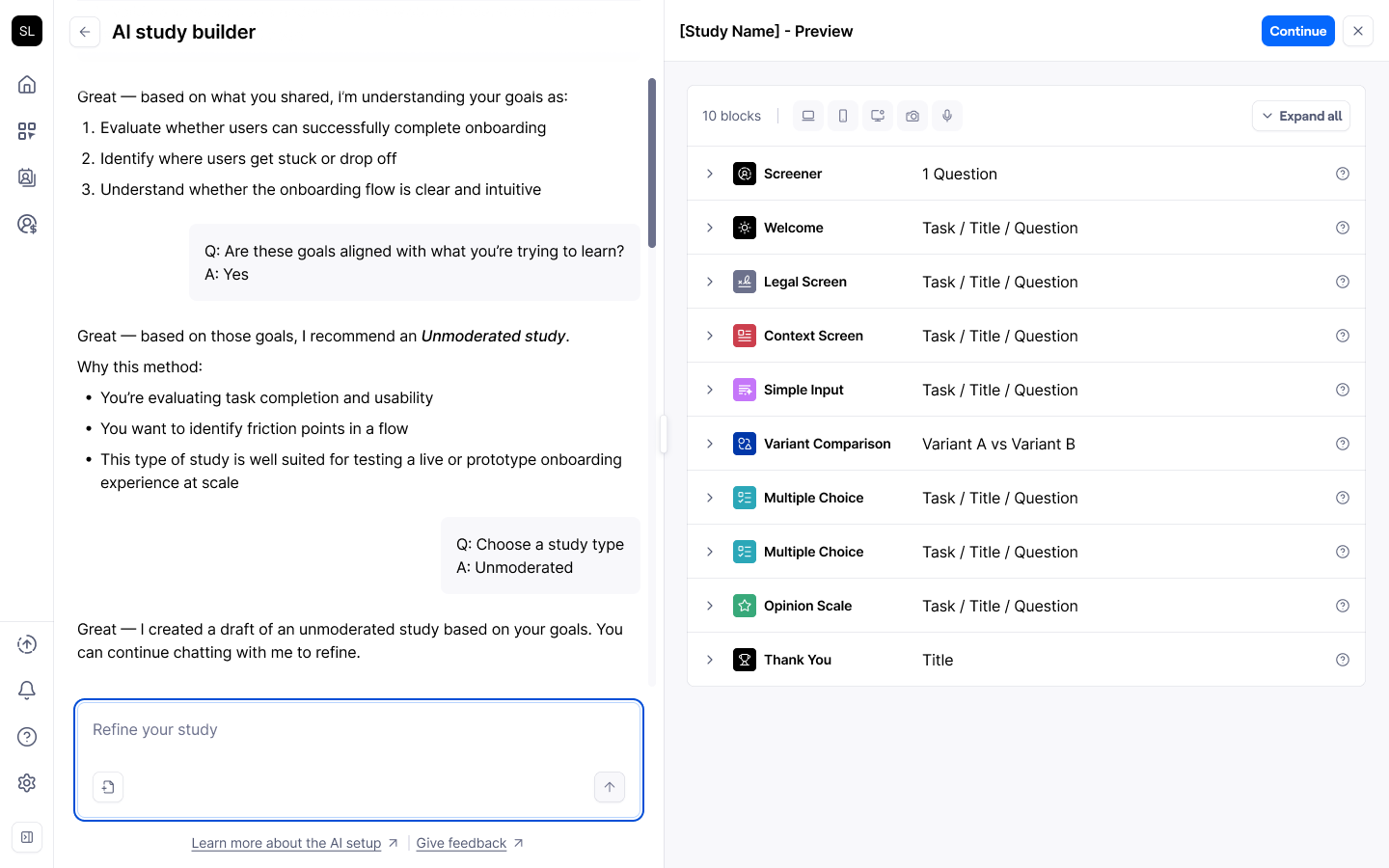
Keep chatting to refine a recommendation
You're never locked into a recommendation. Instead of confirming, you can choose Cancel / keep chatting and push back — for example, "Actually, I'd rather do something more lightweight," or "What if I only have 30 minutes of participants' time?" The Assistant will pick up the conversation and reconsider its recommendation based on what you tell it.
Availability
The AI Assistant on the Home screen is currently available to customers without AI-Moderator.
If your goal is best served by an AI-moderated study, the Assistant will still surface it as the recommended method, shown as an upgrade option. The full hand-off into the AI-moderated builder from the Assistant is coming soon for AI-Moderator customers.
Tips for getting the best recommendation
Lead with the goal, not the method. Describe what you want to learn and why; let the Assistant handle the "how."
Add context early. Mention who your participants are, any constraints (time, sample size), and what decision the research will inform.
Attach a brief if you have one. A research plan or PRD can cut down the back-and-forth and produce a sharper recommendation.
Refine before you commit. If a recommendation feels off, keep chatting — it's quicker to adjust in the conversation than after you're in the builder.
Still need help?
If you have any questions or concerns, please let our Support team know — we'd be happy to help!