How does Maze account for dynamic URLs in website tests?
Last updated: August 7, 2026
During website testing, you might need to use dynamic URLs that include variables.
If Maze only looked at an exact match of the URL for measuring the success of the mission, any dynamic URLs would be different for each participant, and therefore the paths would be classified as unsuccessful.
For instance, imagine that the task is to create a new project on your website. The success path you’ve defined is the following:
https://yourwebsite.cohttps://yourwebsite.co/newproject https://yourwebsite.co/newproject/230498/
The final (success) URL is a dynamic URL where the unique ID 230498 is a variable.
To account for these variations, we aggregate dynamic URLs, so that they can be categorized accurately.
How does URL aggregation work?
Dynamic URLs are supported in Maze. Here’s how it works:
We identify which parts of a URL path name are dynamic
To do this, we check whether part of the path name in question is fully numeric (e.g. 230498) or has a combination of letters and numbers (e.g. 23l4uh2lriuq34hr34). In such cases, we consider it a variable.
We aggregate participant paths according to variables
We use those detected variables to aggregate together paths.
We consider variables when defining the success of a path
If we detect variables in URLs, we consider them when defining whether a path was a direct or indirect success, or whether the mission was not completed.
Learn more about your website testing results
Examples
Example 1: How paths containing variables are aggregated
Participant 1:
https://yourwebsite.co/https://yourwebsite.co/newproject/230498
Participant 2:
https://yourwebsite.co/https://yourwebsite.co/newproject/458437
Both participants will be aggregated into Path 1 (2 participants):
https://yourwebsite.co/https://yourwebsite.co/newproject/:xxxxxx
Example 2: How variables are considered in the success of a path
Consider the following success path:
https://yourwebsite.cohttps://yourwebsite.co/newproject https://yourwebsite.co/newproject/230498/
We detect that /230498/ is a variable.
The following path is considered a direct success:
https://yourwebsite.cohttps://yourwebsite.co/newproject https://yourwebsite.co/newproject/778899/
On the other hand, the following path is considered an indirect success:
https://yourwebsite.co/https://yourwebsite.co/dashboardhttps://yourwebsite.co/settingshttps://yourwebsite.co/newprojecthttps://yourwebsite.co/778899/
Why are some paths marked as Uncategorized?
The Maze algorithm guesses if a URL segment contains a variable. However, path aggregation and categorization don’t work successfully 100% of the time. In some cases, results may be inconclusive.
For instance, you may have product categories on your e-commerce site that are indeed variables, but that we are not able to identify:
https://ecommerce.com/categories/food/product/2342342
https://ecommerce.com/categories/clothing/product/2345234
In this case, we would be able to detect /2342342/ as a variable, but not /food/ or /clothing/, since they’re not numeric or alphanumeric variables.
When we are not sure about the outcome of a path, we classify it as Uncategorized. This was designed to avoid showing potentially incorrect information in your results.
You’ll be asked to classify these paths manually to make sure they match your definition of success.
How do I manually categorize paths?
Uncategorized paths are marked as such in your Results dashboard with the following message:
Uncategorized paths ready to review

Move them into success categories to better display your results
To review them, click Review paths or open the Uncategorized tab.
Open each path and check the screens to evaluate whether it was successful or not.
Once you’ve made your decision, click Move to, then select the appropriate outcome in the dropdown:
Direct success: Participants who completed the mission via an expected path
Indirect success: Participants who completed the mission via an unexpected path
Mission unfinished: Participants who abandoned the mission, or finished it on the wrong screen
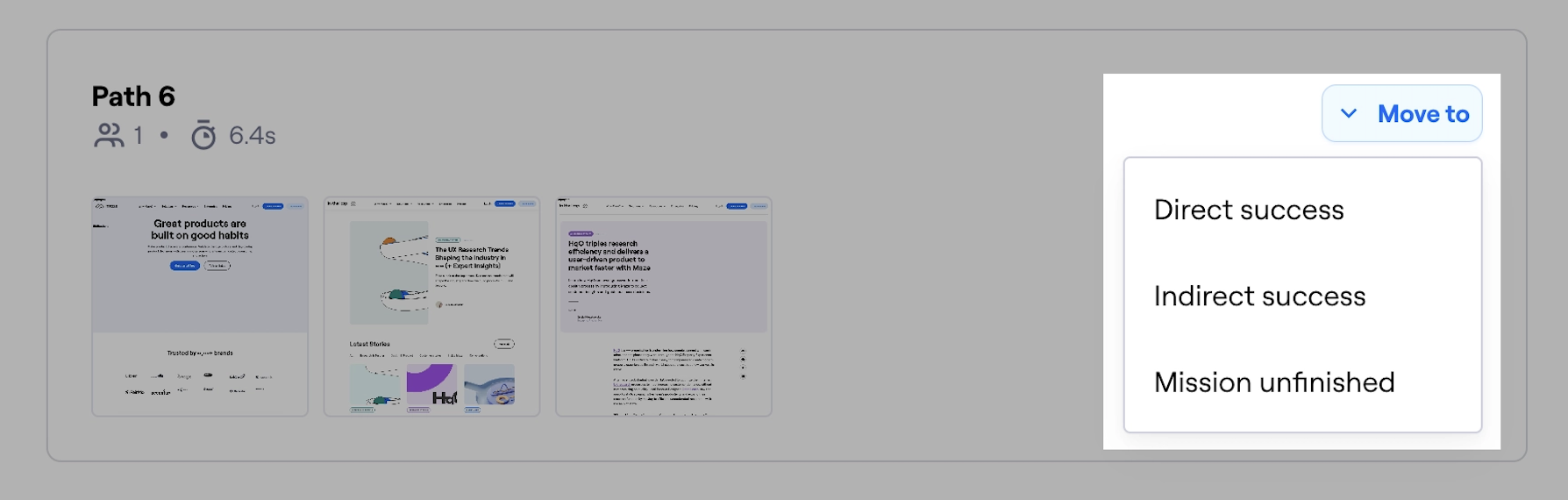
If there’s been a mistake in path categorization, you can easily use the Move to option to move the path to the correct outcome.