Hosting and testing prototypes in Maze
Last updated: November 27, 2026
The Website block lets you host a static HTML file or zip directly in Maze. Participants test it like any website — no need to deploy it or make it public first. Use it for prototypes built in Claude Design, exported from a design tool, or generated with any AI coding assistant.
Who can use this feature?
This functionality is available on Enterprise plans only.
How to upload a site
Open your draft maze, or create a new one.
Click Add block and select Website.
Click Add task URL
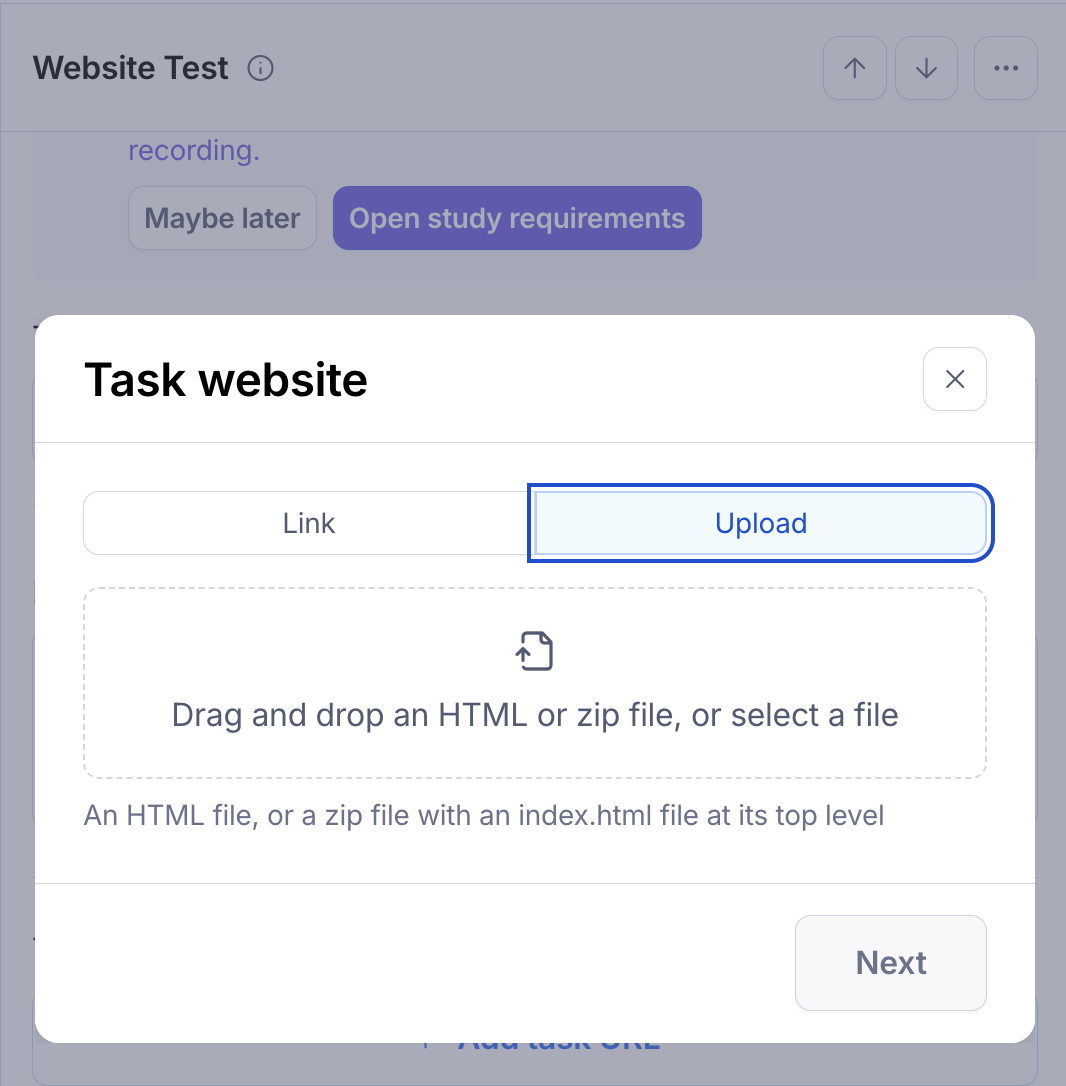
Choose the upload option instead of entering a URL.
Select one
.htmlfile or one.zipfile and wait for upload and processing to finish.Preview the block, then publish.
To change the site, upload a new file to the same block. To go back to a normal website, enter a URL in the block.
Upload rules
HTML file: .html or .htm, up to 10 MB, not empty.
Zip: up to 50 MB, with index.html at the top level (not inside a folder, lowercase).
Zip limits: 1,000 files, 200 MB expanded, 10 MB per file, no symbolic links.
Allowed file types: html, htm, css, js, mjs, json, map, txt, png, jpg, jpeg, gif, webp, svg, ico, woff, woff2, ttf, otf, mp4, webm, mp3, wav. Each file must really be what its extension says.
Not supported: server code (PHP, Node), WebAssembly, .xml, .pdf, files without an extension, hidden files.
Client-side routes: a single-page app can fail on reload or a direct link to a route. Link pages with real .html files, or keep the app on its home route.
Private access
Hosted sites are private. Participants can only open a site through the study.
Each participant gets a personal link that works for 24 hours.
Opening the site without a valid link shows a blank "Forbidden" page.
Access ends when the participant submits the last block.
Your builder preview uses its own temporary link, valid for 24 hours.
Don't share the site address directly — share the normal study link instead.
If a participant sees "Forbidden", ask them to reopen the study link. If they already completed the study, they can't reopen the site.
Duplicating a study copies the site, and the copy is private too.
Prompt to make your site compliant
If your prototype was built with an AI coding tool or exported from a framework, copy the prompt below into the AI assistant along with your site's code. It checks your project against Maze's upload rules, fixes what breaks them, and returns the final file tree and zip command.
Package a static website so it uploads to Maze's hosted website feature. Check my project against these rules, fix what breaks them, and give me the final file tree and the zip command.

1. Fully static: no server code or build step. Give me the built output (dist or build folder).
2. index.html at the top level of the zip, lowercase, not inside a parent folder.
3. Allowed file types only: html, htm, css, js, mjs, json, map, txt, png, jpg, jpeg, gif, webp, svg, ico, woff, woff2, ttf, otf, mp4, webm, mp3, wav. Each file must really be that type.
4. Limits: zip 50 MB, 1,000 files, 200 MB expanded, 10 MB per file. A single HTML file is under 10 MB and not empty.
5. Names: no "..", backslashes or leading "/", no duplicate names, no symlinks.
6. The site is served from the root of its own address. Use /assets/app.js or ./assets/app.js. Link pages to real files (about.html), not client-side routes.
7. The page can only fetch from its own address. Replace API calls to other servers with bundled data (for example a local JSON file). External images, fonts, stylesheets and scripts are fine.
8. No forms that submit, popups, alert/confirm, downloads or navigation to other sites.
9. Do not add a Maze snippet. Maze adds it.

Return what you changed, the file tree, and the zip command so contents sit at the top level (for example: cd dist && zip -r ../site.zip .).
Error messages and fixes
Error message | What to do |
|---|---|
"The zip needs an index.html file at its top level." | Zip the folder's contents, not the folder itself. |
"The zip file is larger than 50 MB" | Compress or remove files. |
"The HTML file is larger than 10 MB." | Compress or remove content from the file. |
"The zip has more than 1,000 files." | Remove unnecessary files. |
"The zip expands to more than 200 MB." | Remove or compress files. |
"<name> is larger than 10 MB." | Compress or remove that file. |
"<name> has a file type we don't support." | Remove the file. |
"<name> doesn't match its file extension." | Use a real file of that type. |
"<name> has a path we can't accept." | Rename the file. |
"<name> is a symbolic link." | Replace the link with the actual file. |
"We couldn't read the zip file." | Check the zip isn't damaged. |
"The HTML file is empty." | Make sure the file has content. |
"The HTML file isn't a text file." | Confirm the file is a valid |
"We couldn't add the Maze snippet to your page." | Upload again, or contact support. |
"Your plan does not include website blocks." | The team needs a paid plan. |
How hosted sites work and what they can't do
This section is for IT and security teams who need to understand how Maze-hosted sites work before allowing them in your environment.
Hosting
Hosted sites are static. Maze doesn't run server code, databases, or build steps.
Sites are served over HTTPS from a Maze domain that is separate from the Maze app. Each site has its own address.
Maze loads the site inside the Website block, so participants stay in the study.
If your network filters traffic, participants need access to Maze's hosted-site domain. Contact support for the current domain list.
Privacy and security
Each participant opens the site through a personal link that expires after 24 hours and stops working when they submit the study. See Private access.
Hosted pages run in a restricted browser sandbox. Maze doesn't review or change your code, so don't include confidential data or real customer data in a prototype.
Maze adds its tracking snippet to your pages automatically. You don't add anything.
What hosted pages can't do
Submit forms, open popups, show
alertorconfirmdialogs, download files, or send participants to another page outside the site.Call other servers. Requests to an API or backend outside the site fail — bundle data inside the site instead.
Use service workers.
What still works
JavaScript, including frameworks such as React and Vue, as long as the site is static.
Images, fonts, stylesheets, and scripts loaded from other websites (such as Google Fonts or an image CDN). Maze doesn't block them — check them against your own data rules.
Cookies and local storage for the site itself. They aren't shared with Maze or with other hosted sites, and a new upload starts with empty storage. Note: browsers that block third-party storage may limit an embedded page.
Data retention
Maze deletes a hosted site when its study is permanently deleted, or when it is removed from a block and no block uses it.
Still need help?
If you have any questions or concerns, please let our Support team know — we'll be happy to help!