Build a research repository with the Maze MCP
Last updated: October 23, 2026
With the Maze MCP, your AI app can turn your Maze studies into a research repository: one shareable page with every study, key learnings by theme, project and topic, and participant quotes linked back to their sessions. You paste one prompt, and your AI app reads your workspace and builds the page.
It's a good fit for research and product teams who want one place for everything they've learned, without maintaining a separate repository tool.
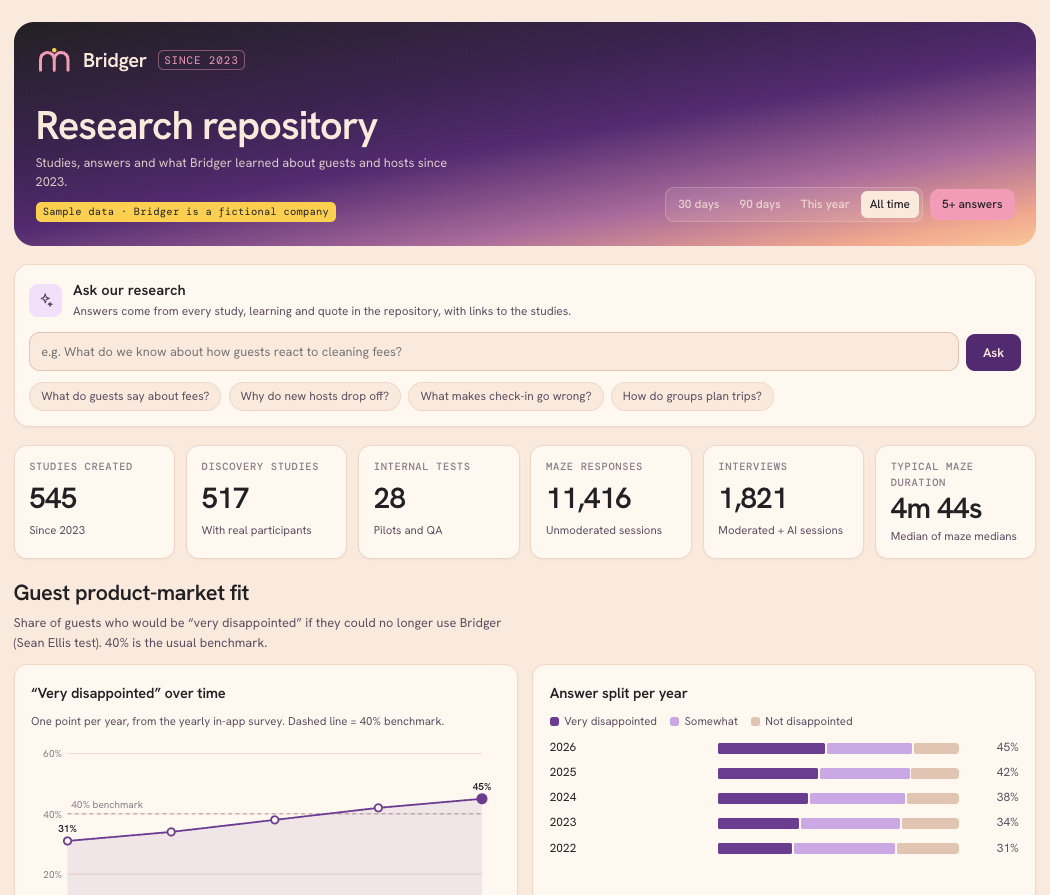
See an example: Research repository (built on a fictional brand with made-up data).
Before you start
The Maze MCP is available on Enterprise plans.
Connection: Connect the Maze MCP to your AI app with the server URL
https://connect.maze.co/mcp. Steps for each app are in Set up Maze MCP.Permissions: The MCP reads Maze with your own permissions, so the repository only includes studies you can already see.
AI app: These prompts were built and tested in Claude, which builds the [repository/dashboard] as a shareable page (an artifact).” Article 1 keeps “including the ‘Ask our research’ box.
Time: Large workspaces take a while. Your AI app reads every study, then summarizes each project, so expect several minutes for a few hundred studies.
What's in the repository
Headline figures: studies, discovery studies, internal tests, maze responses, interviews and the median completion time across mazes.
Ask our research: a box where anyone can ask a question and get an answer with quotes and links to the studies behind it.
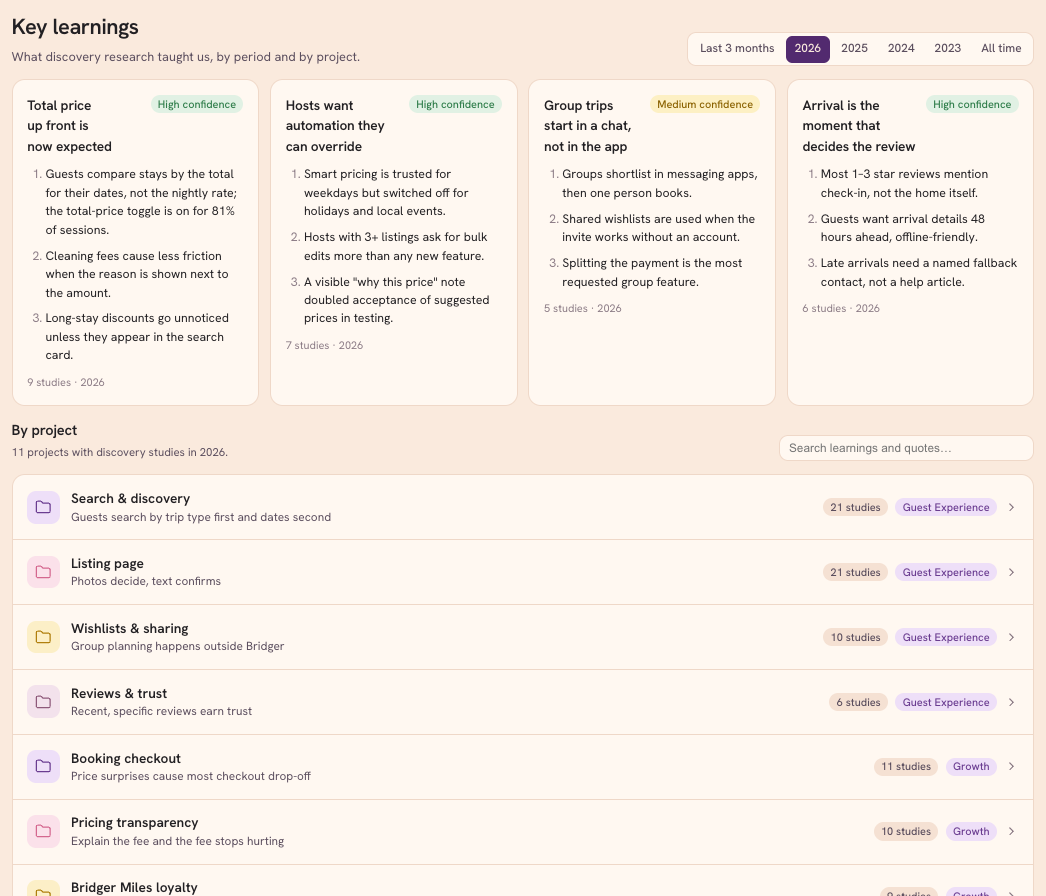
Key learnings: themes by year with a confidence level, plus expandable views by project and by topic, each with search.
Activity: studies and sessions per quarter, by study type.
Block usage, top creators and top projects.
Recent studies: a searchable, sortable table. Click a study to see its figures, learnings, quotes and related studies.
How to build it
Copy the prompt below into a new chat with the Maze MCP turned on.
Fill in the placeholders: your Maze team name for
[TEAM NAME], a date for[START DATE], and either your brand colors or "a clean neutral style".Send it. Your AI app finds your team, lists every study since the start date, reads summaries, highlights and themes, and pulls quotes from transcripts.
Check the numbers. Ask your AI app to confirm the study count matches what you see in Maze, and spot-check a few quotes against their sessions.
Refine it in conversation, for example "Add a topic for onboarding" or "Hide the block usage section".
Share it. In Claude, use Share on the artifact to give your team a link.
The prompt
You have access to my Maze workspace through the Maze MCP.
Goal: build a research repository for my Maze team "[TEAM NAME]" covering studies since [START DATE], as a shareable artifact.

1. Inventory
- Call get_user_details and pick the team named above.
- Run `search` once per study type (entityTypes: unmoderated_study, then moderated_study, then ai_moderated_study) with teamId, query "", includeArchived true, dateFilter { dateField: "createdAt", from: [START DATE] }. Page with pagination.nextCursor until pagination.complete is true; check the row count equals pagination.total.
- Keep: id, name, link, type, created date, first answer date, creator, workspace, project, status, answers (completed responses or interviews), median duration (unmoderated).
- Category: "Internal test" if the name contains test, QA, pilot, demo or copy, or if all answers come from our own team; otherwise "Discovery".

2. Learnings (Discovery studies with 5+ answers only)
- Work per project, one sub-agent per project, each writing its own file.
- Read cheaply first: `search` with projectIds and entityTypes ["highlight", "theme"] at detail "full"; get_moderated_study / get_ai_moderated_study with detail "summary" and includeTranscriptionSummaries true; get_unmoderated_study with detail "summary" for block stats. Open full transcripts only to pull exact quotes.
- Per project: one headline learning, 3 findings, 2–3 verbatim quotes with the participant label, and each quote linked to its session or study.
- Across projects: 3–5 themes per year (and one set for the last 3 months). Confidence: High = 3+ studies agree, Medium = 2, Low = 1. Show the number of supporting studies.
- By topic: group findings into 6–10 topics that cut across projects (e.g. pricing, trust, mobile, accessibility). Use our existing Maze tags and themes as the starting list when they exist. Per topic: a one-line description, 2–4 findings tagged with the projects they come from, 1–2 quotes, and the related studies.

3. Output
- Header with filters: 30 days / 90 days / this year / all time, plus a "5+ answers" toggle that applies to the whole page.
- Headline figures: studies, discovery studies, internal tests, maze responses, interviews, median of maze medians.
- An "Ask our research" box that sends the question and the repository data to Claude and answers with quotes and links to the studies
- Key learnings: theme cards with year tabs; an expandable "By project" list (headline, findings, quotes, studies) and an expandable "By topic" list (description, findings with project tags, quotes, studies), each with a search that highlights matches.
- Activity per quarter, stacked by study type, with Studies/Sessions and Per quarter/Cumulative toggles.
- Block usage in mazes; top 10 creators and top 10 projects, each rankable by studies or responses.
- A recent-studies table with tabs (All / Unmoderated / Moderated & AI-moderated), search, a category filter and sortable columns (name, type, category, project, creator, created, answers, median duration, status). Clicking a study opens a panel with its figures, learnings, quotes and other studies in the project.

Use [our brand colors / a clean neutral style], with one color per study type used consistently. Add a methodology note covering the category rule, the confidence levels and the 5+ answers filter.
Make it your own
What you want | What to change in the prompt |
|---|---|
Only some projects | Add "Only include these projects: …" under Inventory |
Your own definition of internal tests | Edit the Category line, for example add the words your team uses for pilots |
Different topics | List them under By topic, or say "Use only our existing Maze tags" |
A lighter page | Delete the Output lines you don't need, such as block usage or top creators |
Your branding | Replace the style placeholder with your hex colors and font, or attach your brand guide |
Good to know
It's a snapshot. The repository shows your data as of when it was built. To refresh it, run the prompt again in the same chat, or ask "Update the repository with studies since [date]".
Learnings come from studies with 5+ answers. Smaller studies still appear in the table, but don't feed themes or confidence levels.
Confidence is based on study count: High means 3 or more studies agree, Medium means 2, Low means 1.
Archived studies are included; deleted studies aren't available through the MCP.
Results vary slightly between AI apps and runs. Themes and summaries are written by your AI app, so review them before you share.
Think before sharing widely. The repository includes participant quotes. Share it with the same people who can see that research in Maze. See Maze MCP Data & Privacy.
Troubleshooting
Issue | What to try |
|---|---|
Fewer studies than expected | Check the team name matches Maze exactly and that you have access to those projects. Ask your AI app to confirm the row count matches the total. |
The AI app stops partway or runs out of space | Use a later start date or limit it to a few projects. See Get token-efficient answers from the Maze MCP. |
"Ask our research" doesn't answer | That box needs an AI app whose shareable pages can call the AI, such as Claude. Otherwise, ask "Remove the Ask our research box". |
Quotes have no participant label or link | Ask your AI app to open the session transcripts for those quotes. |
Still need help?
If you have any questions, please let our Support team know. We'll be happy to help!