Why is my Figma prototype not loading in the prototype preview in Safari?
Last updated: June 25, 2026
Due to an ongoing issue, Figma prototypes may sometimes not load in the prototype preview when using Safari.
If you believe you’ve been affected by this issue, please let our Support team know.
Workarounds
Ensure that your Figma prototype isn’t restricted
Double-check that you've set the permissions for your Figma prototype to Anyone with the link can view. Otherwise, the prototype preview won’t load.
Learn best practices for importing your Figma prototypes
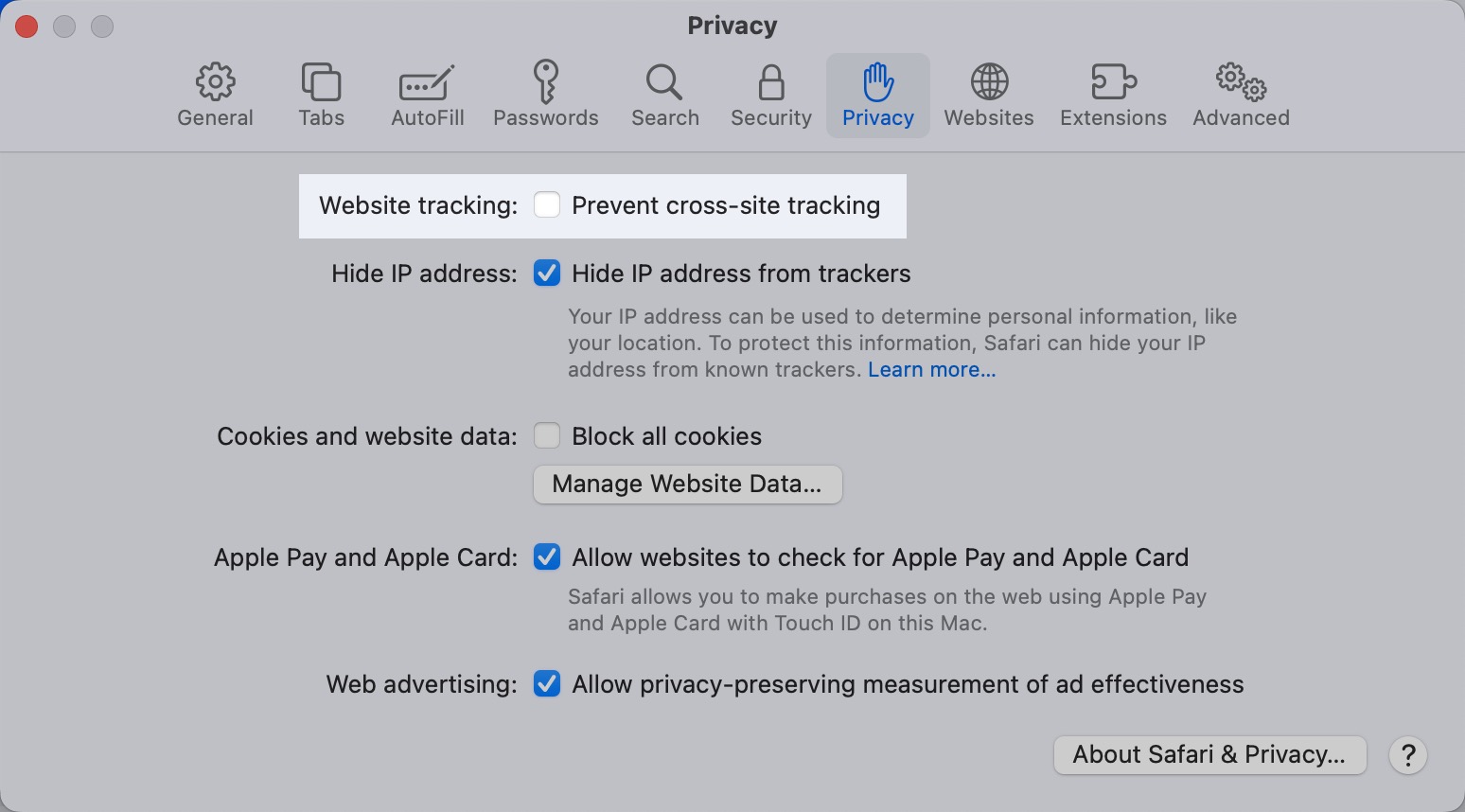
Prevent cross-site tracking
Open Safari.
Open Settings, and then navigate to the Privacy tab.
Ensure that the option to Prevent cross-site tracking is unchecked.
Clear cache and cookies
In some cases, the issue can be resolved by clearing the cache and cookies in Safari.
Use a different browser
If the issue persists after trying these fixes, we recommend temporarily using a different browser to import your Figma prototypes.
Still need help?
If you have any questions or concerns, please let our Support team know — we'll be happy to help!