[Prototype test] Refreshing prototypes in Maze
Last updated: August 7, 2026
Refresh the prototype in your draft study every time you change your prototype. This will fetch the latest version of the prototype, while maintaining all the blocks and success criteria in the draft study.
It’s only possible to refresh a prototype in a draft study. Prototypes in a published study can’t be refreshed. If there were major changes to your prototype after publishing the study, we recommend you duplicate the study and refresh the prototype.
How to refresh your prototype
When you refresh a prototype, Maze downloads the latest data from your design file.
To get the latest version of a prototype in your study:
Open the draft study that contains the prototype to be updated.
In the prototype preview panel on the right side, click Refresh my prototype. Depending on the size of your prototype, the prototype might take a few seconds to refresh.
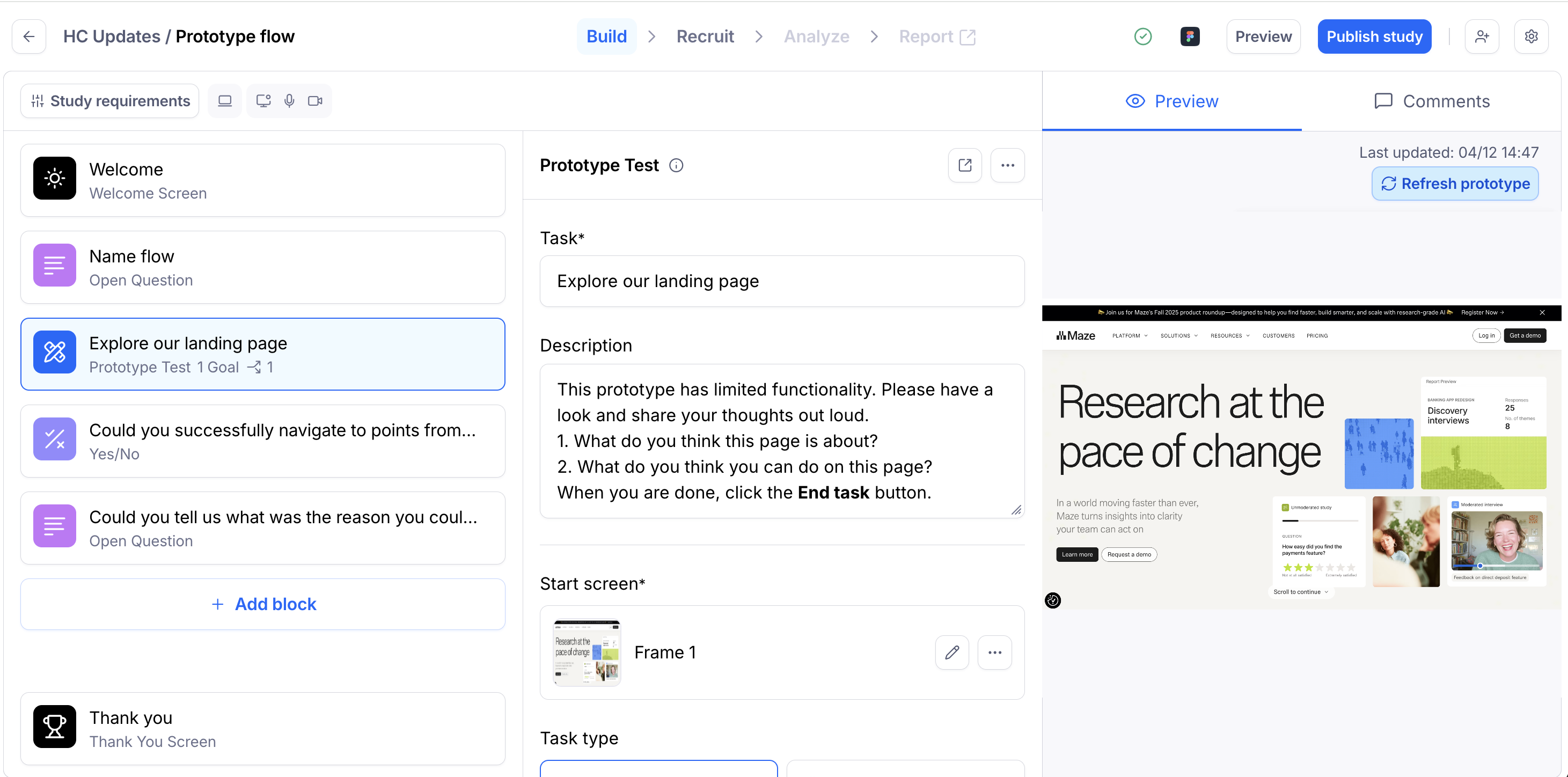
If you’ve linked the same prototype in other studies, you’ll need to repeat these steps to refresh the prototype in each study.
Changing a Figma prototype after importing it
Always refresh prototypes before publishing your study to ensure that Maze has the most recent data.
Use the refresh button any time you change a Figma file after importing it into Maze. This ensures that Maze has imported the latest data related to hotspots, success paths, etc., which is fundamental for the results and reports to work correctly.
Maze displays the prototype exactly as it is in your Figma file. Any changes made to the linked Figma file will be immediately reflected and visible to participants.
Significant changes to the prototype may break any success paths you may have defined in your study, or lead to incorrect heatmaps.
Learn more about updating Figma files after publishing a study
Troubleshooting
Sometimes, you might run into an error when refreshing your prototype.
There are a few reasons these errors typically occur:
There’s been a cache or integration issue: Check if the issue persists when opening the page in an incognito/private window or a different browser. If you don’t see the error from there, clearing your browser’s cache and cookies might help solve the issue.
The file is too large and can’t load: Ensure your file is optimized for Maze. Learn more about creating a Maze-ready Figma prototype
The file is no longer available: Confirm that the prototype has the correct sharing permissions. Learn more about the supported Figma permissions
If you continue to run into issues after following these steps, please reach out to Support.
Still need help?
If you have any questions or concerns, please let our Support team know — we'll be happy to help!